This document assumes that you have read the "EGYM Cardio UI Integration guide" which gives a high level overview about the overall integrations, workflows and states of the system. This document describes the Javascript interface between the Cardio console and the EGYM Cardio UI in technical detail. This document suits you if you are a software developer of a piece of cardio equipment and want to adapt to the EGYM Cardio UI interface.
The locale should be a string composed of the language code, as defined in ISO 639, and the country code, as defined by ISO3166-1, concatenated by the underscore ("") character. As an example the following locale en_US represents the English language in the United States.
The Unit Systems (System of Measurement from Wikipedia) defines the units that the different measurement systems use. Currently the following values should be understood by the console:
- METRIC
- IMPERIAL
The webapp needs to have read access to some injected object called vendorApi. This object will have a function exposed getEquipmentInfo which returns the vendor. Vendor value returned by getEquipmentInfo will be used to differentiate the api binding.
The underlying platform should be able to provide to the webapp the data storage capabilities described below.
The webapp needs to have read access to some settings that are permanently stored in the console and are related to the equipment itself or to the gym where the console is commissioned. The configuration of these settings, when it applies, should be possible in the console though an administration screen or by some other means (i.e. they can be server side stored and transferred to the console and made available during the lifetime of the EGYM Cadio UI).
The local data storage is a kind of storage that the EGYM Cardio UI uses to write and read data from. Regarding data durability, it's preferred that the data stored under the local data storage can survive console reboots to support the use-case of supporting the offline operation in the future.
This storage should store the data in a key => value form so that different data can be stored by the EGYM Cardio UI, and later can be retrieved.
The document "EGYM Cardio UI Integration guide" defines the Program flow that composes the GUI application. The following table shows all screen states provided by the webapp:
| Screen State |
|---|
| Walkin state |
| Login state |
| Workout Pre-Training State |
| Workout Summary State |
| EGYM Fitness Test workflow * |
- Note on the EGYM Fitness Test workflow: Depending on the User choice on the Workout Pre-Training State screen, he can choose to perform an EGYM Fitness Test, which may take him to the EGYM Fitness Test workflow.
The following diagram shows an overview of the EGYM Cardio UI software running inside the console WebView:
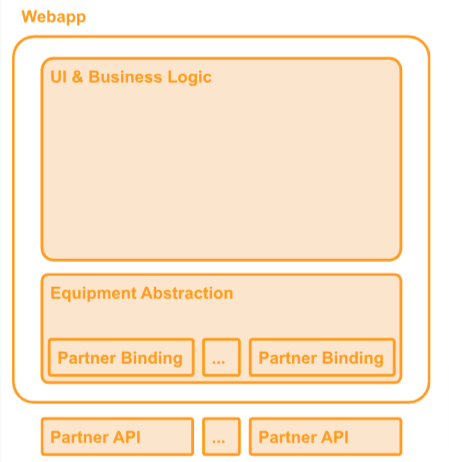
In the UI & Business Logic layer is where all the screens are defined and where the logic related to the EGYM Cardio UI exists. It is where all user interactions are handled and it uses the underlying layer to communicate with the equipment.
The Equipment Abstraction layer provides a stable API that the UI & Business Logic layer can use without the need to adapt to partner specific requirements. Still inside this layer there is the Partner Binding component which will ensure that the Partner API functions and callbacks are correctly binded to the Equipment Abstraction, to enable the correct behaviour of the UI & Business Logic layer.
At the bottom there is the Partner API that allows interaction of the Webapp with underlying Equipment.
The Workout State Machine should be maintained by the console and it should notify the webapp about the state changes. Below the state diagram describing the expected state machine transitions:
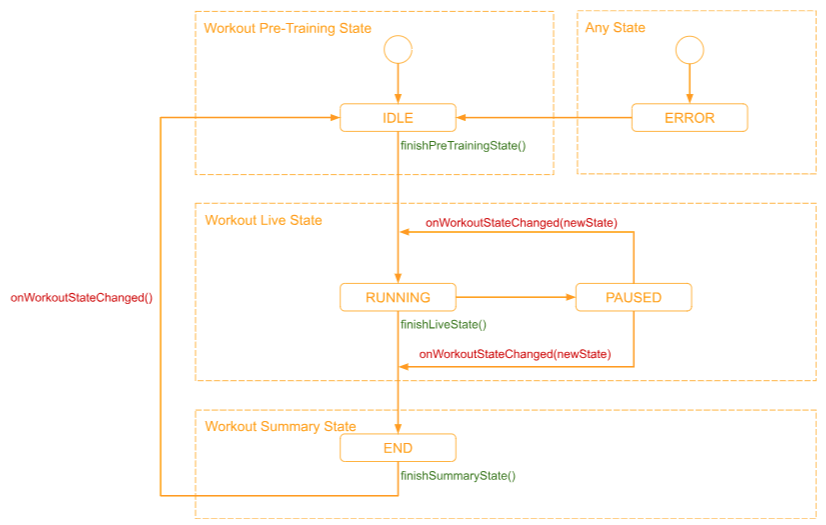
In green there are represented the functions that the EGYM Cardio UI invokes in order for the console to leave its current state.
In red we can see the callbacks that the EGYM Cardio UI is expecting to be invoked.
| State | Description |
|---|---|
| IDLE | The initial for the Workout state machine, before the actual workout begins. When the Workout Pre-Training State screen is shown the console should be in this state |
| RUNNING | The RUNNING state means that the workout is ongoing and the User is exercising. At this point the Workout Live State should be displaying on the console screen |
| PAUSED | The PAUSED state should be reached when the User presses the Pause button on the console while the exercise is ongoing. It is expected that when the workout is paused, the console shows a overlay screen and present the user the possibility to resume or to terminate the workout |
| END | The END state should be reached when the current workout is finished and the GUI is at the Workout Summary state so it can display the workout details and also the workout historical results to the User |
| ERROR | The ERROR state should be set whenever an error related to the equipment occurs. It is expected that after the error state, the IDLE state is reached again |
For the EGYM cardio UI to be able to interact with the underlying platform, a set of functions must be made available so that each webapp can react to events that happen, through the means of callbacks, or to get and set values from the console software.
It is expected that the underlying SW running in the console injects a JavaScript object (called vendorApi) into the WebView where the EGYM cardio UI is running, making it possible the correct behavior of the current webapp. In the sections below all the callbacks and functions that the injected Javascript object should contain are described, expressing what the Equipment Abstraction layer expects what the Partner API should look like (please refer to section Webapps), in order to make the integration to a new partner as simple as possible.
The onLocaleChanged(oldLocale, newLocale) function should be called by the console when its locale changes. This callback should be invoked as a result of the invocation of [setLocale(newLocale)] function as well on the console changes the locale by other triggers external to the webapp.
For more information about the locale format please see the [Locale] section.
Returns: none
Arguments:
| name | type | description |
|---|---|---|
| oldLocale | string | The locale used by the console before the locale changes |
| newLocale | string | The locale that will be used by the console after the locale changes |
The onUnitSystemChanged(oldUnitSystem, newUnitSystem) function should be invoked by the console when the unit system changes. This callback should be invoked as a result of the invocation of [setUnitSystem(newUnitSystem)] function as well on the console changes the unit system by other triggers external to the webapp.
For more information about the unit systems please see the [Unit Systems] section.
Returns: none
Arguments:
| name | type | description |
|---|---|---|
| oldUnitSystem | string | The unit system used by the console before the unit system changes |
| newUnitSystem | String | The unit system that will be used by the console after the unit system changes |
The onRfidRead(format, rfidHex) function should be invoked by the console when the RFID reader reads the User RFID tag. All the bytes read from by the RFID reader should be passed to the Webapp when invoking this callback, together with the RFID tag format.
Returns: none
Arguments:
| name | type | description |
|---|---|---|
| format | string | The format of the RFID tag read by the RFID reader |
| rfidHex | string | String containing an hexadecimal representation of the bytes read from the User RFID tag |
This callback should be invoked by the console to inform the Webapp that its state machine reached a new state.
For more information about the console states please refer to the [Workout State Machine] section.
Returns: none
Arguments:
| name | type | description |
|---|---|---|
| newState | string | String containing the new state the console state machine entered. Possible values are: "IDLE", "RUNNING", "PAUSED", "END" and "ERROR" |
This function should be invoked by the console to inform the Webapp about current workout values. This callback should be invoked periodically (in 1 second intervals for instance) when the workout state machine is in state "RUNNING".
Returns: none
Arguments:
| name | type | description |
|---|---|---|
| workoutInfo | String | String containing a JSON object with the current workout information. The following fields are recognized by the Webapp: { “elapsedTime”: number // The elapsed time, in second, since workout start “distance”: number // The distance, in kilometers, for the current workout “totalStrides”: number // The total numbers of strides “kcal”: number // The total number of kcal the user spent during the workout “heartRate”: number // The current User heart rate, in beats per minute “averageHeartRate”: number // The average User heart rate during the workout “speed”: number // The current speed in km/h “spm”: number // The current Steps Per Minute value “averageSpm”: number // The average Steps Per Minute for this workout “averageSpeed”: number // The average speed for this workout “rpm”: number // The current Rotations Per Minute value “incline”: number // The current Incline value, in percentage “ramp”: number // The current Ramp value “resistance”: number // The current Resistance value “floors”: number // The current Floors value } |
This callback should be invoked by the console to inform the Webapp that EGYM Smart Cardio quick start workout should be started.
Returns: none
Arguments: none
This function is invoked by the webapp and it should redirect the user to Vendor experience. EGYM Cardio UI should be hidden, but still running in the background.
Arguments: none
This function is invoked by the webapp and it should return the current locale in use by the console.
For more information about the locale format please see the [Locale section].
Returns:
| type | description |
|---|---|
| string | The locale the console is currently using |
Arguments: none
The setLocale(newLocale) function will be invoked by the webapp and the console should set its current locale to the value passed in the newLocale parameter. After setting the locale value, the console should notify this change to the webapp through the invocation of the [onLocaleChanged(oldLocale,newLocale)] event handler.
For more information about the locale format please see the [Locale section].
Returns: none
Parameters:
| name | type | description |
|---|---|---|
| newLocale | string | The value of the new locale to be set on the console |
This function is invoked by the webapp and it should return the current unit system in use by the console.
For more information about the unit system format please see the [Unit Systems] section.
Returns:
| type | description |
|---|---|
| string | The unit system currently used by the console |
Arguments: none
The setUnitSystem(newUnitSystem) function will be invoked by the webapp and the console should set its current unit system value according to the value passed in the newUnitSystem parameter. After setting the unit system value, the console should notify this change to the webapp through the invocation of the [onUnitSystemChanged(oldUnitSystem, newUnitSystem)] event handler.
For more information about the unit system format please see the [Unit Systems] section.
Returns: none
Arguments:
| name | type | description |
|---|---|---|
| newUnitSystem | string | The value of the new unit system to be set on the console |
This function is invoked by the webapp to retrieve the current console settings.
For more information about the storage please refer to the [Data Storage] section.
Returns:
| type | description |
|---|---|
| String | String containing a JSON object the with the following fields: |
{ “clientId”: string // The client ID to access the EGYM Partner API “clientSecret”: string // he client secret to access the EGYM Partner API “localeCode”: string // locale configured on the machine “measurementSystem”: string // measurement system configured on the machine “maximumWorkoutDuration”: number // The maximum workout duration in seconds “maximumSeed”: number // The maximum speed in Km/h “maximumIncline”: number // The maximum possible incline, in percentage, for one workout “anyWorkoutConstraint”: number // list shall continue with other constraints } Arguments: none
This function is invoked by the webapp to retrieve arbitrary data from the console local data storage, by specifying the key which the data was previously stored under.
For more information about the storage please refer to the [Data Storage] section.
Returns:
| type | description |
|---|---|
| string | String containing the data stored for the provided key. If no data is stored under the current key, undefined should be returned |
Arguments:
| name | type | description |
|---|---|---|
| key | string | The key which the data is stored under |
This function is invoked by the webapp to store data in the console local data storage, under the specified key. If data stored for the provided key exists it should be overridden with the value provided. After this function returns, the data stored should be immediately available to subsequent invocation of the [getLocalData(key)] function.
For more information about the storage please refer to the [Data Storage] section.
Returns: none
Arguments:
| name | type | description |
|---|---|---|
| key | string | The key which the data is stored under |
| value | string | The data to be stored for the given key |
This function is invoked by the webapp to delete data from the console local data storage, stored under the specified key. After this function returns, the data stored should be unavailable to subsequent invocation of the [getLocalData(key)] function.
For more information about the storage please refer to the [Data Storage] section.
Returns: none
Arguments:
| name | type | description |
|---|---|---|
| key | string | The key which the data is stored under |
This function is invoked by the webapp and it should return relevant information about the current equipment and the console in which the webapp is running.
Returns:
| type | description |
|---|---|
| string | String containing the console information in a JSON format. It should contain the following fields: |
{ “vendor”: // the Equipment Vendor “equipmentType”: , // the Equipment type: e.g bike, treadmill, elliptical, etc. “consoleType”: , // The model of the console “serialNumber”: , // The console serial number “swVersion”: , // The version of the sw running on the console “ipAddress”: , // The current IP address of the console “macAddress”: // The MAC address of console NIC “consoleName”: // The name of the console, if such information is available }
- Other interresting informations about the equipment can be added here Arguments: none
This function is invoked by the Webapp to notify the console that the login process has been handled and the console can accept RFID tag inputs again
Returns: none
Arguments: none
The Webapp will invoke this function to set current logged in user information. This information will be used by console to track the current logged in user's workout.
Returns: none
Arguments:
| name | type | description |
|---|---|---|
| name | string | name of the current logged in user. |
| gender | string | gender of the current logged in user. |
| unit | string | unit of the current logged in user (METRIC or IMPERIAL). |
| id | string | id of the current logged in user. |
| weight | number | weight of the current logged in user. |
| age | number | age of the current logged in user. |
This function is invoked by the Webapp to notify the console that the current logged in user should be logged out and stored user information cleared.
Returns: none
Arguments: none
The function finishPreTrainingState() is invoked by the Webapp to signal that the User selected his Workout, from the Workout Pre-Training State screen and the Workout Live State screen should be entered. As a result of invoking this function the console should invoke the onWorkoutStateChanged() callback after doing all the needed processing and change the state to "RUNNING"
For more information about the different workout states please refer to the [Workout State Machine] section.
Returns: none
Arguments: none
The function finishLiveState() is invoked by the Webapp to tell the console that the Workout Live State screen has ended and it is ready to go to the Workout Summary State screen. As a result of invoking this function the console should invoke the onWorkoutStateChanged() callback after doing all the needed processing and change the state to "END"
For more information about the different workout states please refer to the [Workout State Machine] section.
Returns: none
Arguments: none
The function finishSummaryState() is invoked by the Webapp to inform the console that the Workout Summary State screen is going to be closed and it is ready to go to enter the Workout Pre-Training State screen.
For more information about the different workout states please refer to the [Workout State Machine] section.
Returns: none
Arguments: none
The function pauseWorkout() is invoked by the Webapp to inform the console that the Workout State Machine should be changed to "PAUSED". As a result of invoking this function the console should invoke the onWorkoutStateChanged() callback after doing all the needed processing and change the state to "PAUSED"
For more information about the different workout states please refer to the [Workout State Machine] section.
Returns: none
Arguments: none
The function resumeWorkout() is invoked by the Webapp to inform the console that the Workout State Machine should be changed to "RUNNING". As a result of invoking this function the console should invoke the onWorkoutStateChanged() callback after doing all the needed processing and change the state to "RUNNING"
For more information about the different workout states please refer to the [Workout State Machine] section.
Returns: none Arguments: none
The Webapp will invoke this function to obtain the current console internal state machine state.
For more information about the workout states please refer to the [Workout State Machine] section of this document.
Returns:
| type | description |
|---|---|
| string | The current workout state |
Arguments: none
The Webapp will invoke this function to set the equipment speed value for the current workout. Invocations to this function should be ignored if the workout state machine is not in the "RUNNING" state or if the equipment doesn't support the speed parameter.
For more information about the workout state machine please refer to the [Workout State Machine] section on this document.
Returns: none Arguments:
| name | type | description |
|---|---|---|
| newSpeed | number | The new speed value that should be set on the equipment for the current workout. The value should be in Km/h. |
The Webapp will invoke this function to set the equipment resistance value for the current workout. Invocations to this function should be ignored if the workout state machine is not in the "RUNNING" state or if the equipment doesn't support the resistance parameter.
For more information about the workout state machine please refer to the [Workout State Machine] section on this document.
Returns: none
Arguments:
| name | type | description |
|---|---|---|
| newResistance | number | The new resistance value that should be set in the equipment for the current workout. |
The Webapp will invoke this function to set the equipment incline value for the current workout. Invocations to this function should be ignored if the workout state machine is not in the "RUNNING" state or if the equipment doesn't support the incline parameter.
For more information about the workout state machine please refer to the [Workout State Machine] section on this document.
Returns: none
Arguments:
| name | type | description |
|---|---|---|
| newIncline | number | The new incline value that should be set in the equipment for the current workout, in percentage |
The Webapp will invoke this function to set the equipment ramp value for the current workout. Invocations to this function should be ignored if the workout state machine is not in the "RUNNING" state or if the equipment doesn't support the ramp parameter.
For more information about the workout state machine please refer to the [Workout State Machine] section on this document.
Returns: none
Arguments:
| name | type | description |
|---|---|---|
| newRampValue | number | The new ramp value that should be set in the equipment for the current workout |
The Webapp will invoke this function to lock the paddle changes, in order to fully control the live workout parameters. This is currently used only when performing a fitness test. Vendors and EGYM shall responsibly use this feature, taking in consideration the safety concerns.
Arguments: none
The Webapp will invoke this function to unlock the paddle changes.
Arguments: none
The Webapp will invoke this function, in order to switch from fullscreen to reduced mode. API is required only when the concept of reduced screen is present.
The Webapp will invoke this function, in order to show the message at the top of the screen(a.k.a. Top bar message).
The Webapp will invoke this function, in order to show the smart cardio experience if it's running currently in the background.