EGYM provides the option to log-in via its internal credentials, given that the user is already created with a Gym Membership Software.
EGYM utilizes Firebase as a tool for generating and verifying JWTs (JSON Web Tokens), which in term hold the user identity and some information like the EGYM user ID.
An additional User API is also provided that works with the user identity JWT and offers some more infromation like the user name, email, gender, etc.
Prerequisites to using the EGYM ID platform is to register with EGYM a client ID and a callback URL. The client ID is provided by EGYM to the gym chain platform and the callbackURL must be provided from the gym chain to EGYM. It is the URL EGYM calls after a successful login. See more information about it down below.
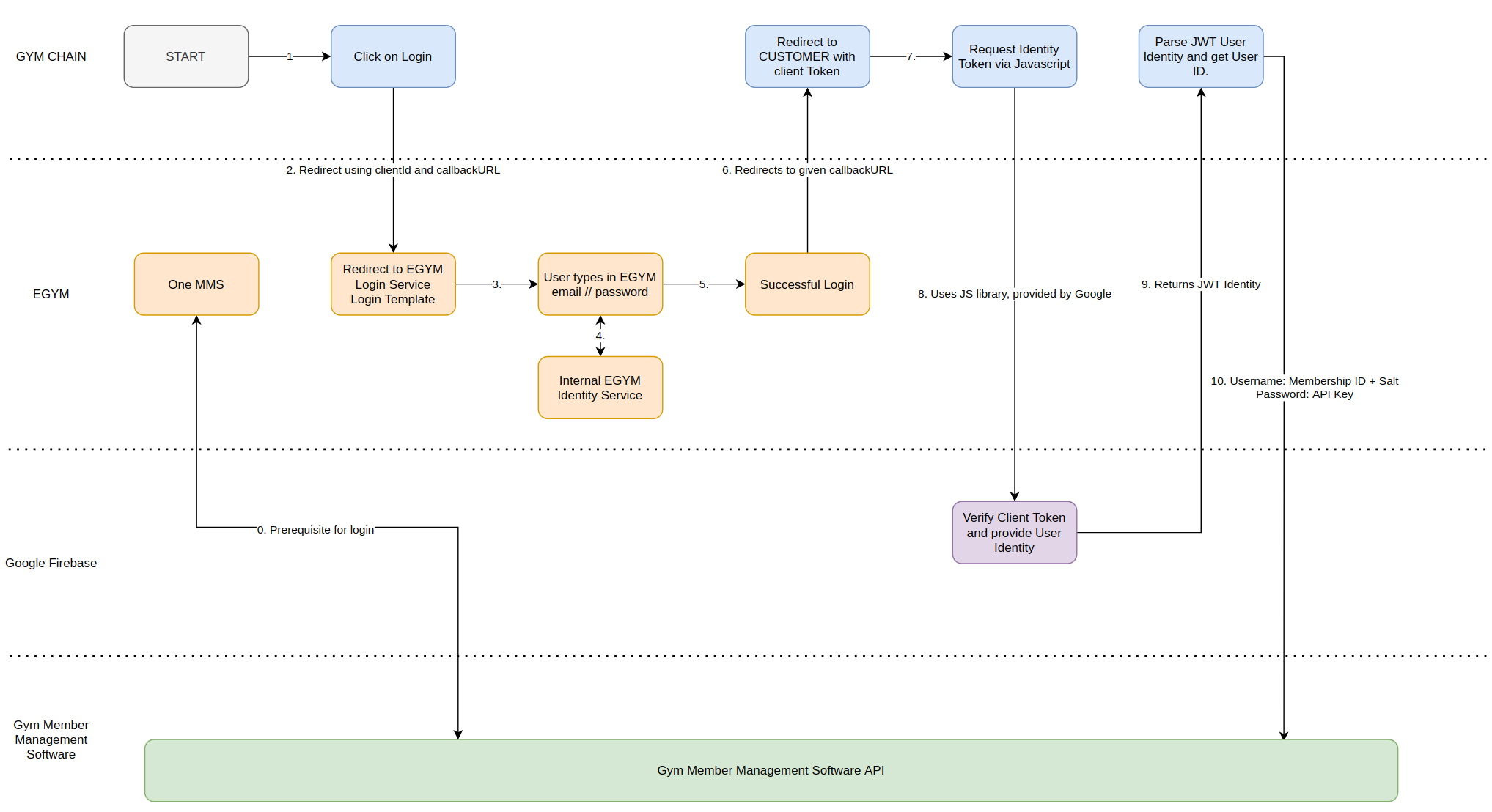
Legend:
- Step 0. This is a prerequisite for the login operation. The user must have a Gym chain account and an MMS provider may push to EGYM via One MMS.
- Step 1. User goes to the webpage of the gym chain com and is not logged in yet (no active cookie or session for the user).
- Step 2. A redirect to the EGYM login service, using the provided clientId to the gym chain and a callbackURL at which the gym chain will expect the client token after a successful login.
- Step 3. User types in their EGYM username/password. If the user has been published by One MMS, but has no password, due to not clicking on the link in the welcome email, they must click on the 'Forgetten Password' link and set a password.
- Step 4. Query EGYM internal service to verify the user's identity.
- Step 5. The user credentials are correct and there are no other errors.
- Step 6. Redirect to an EGYM callbackURL for the gym chain. Pass in the custom client token (a JWT) as a query parameter. Note that this token is not the user identity token.
- Step 7. The gym chain server passes the client token to the Javascript.
- Step 8. The gym chain website uses the provided Firebase library together with the configuration, provided by EGYM, to obtain the user identity token.
- Step 9. Google Firebase Auth verifies the client token and generates an Identity token, which contains the internal EGYM user identifier, which should not be used by our partners.
- Step 10. (Optional) The gym chain server can extract the user id (membershipID) using the GET User Information API. It can use the membershipID together with a salt and the MMS API key to get/book/list classes for the user.
Here is a sample JS implementation for retrieving the Identity token, given the Firebase Custom Token.
firebase.auth().signInWithCustomToken({{.FirebaseToken}}).catch(function(error) {
           // Handle Errors here.
       }).then(function(userCredential) {
           // The user credential can be used to get the user Identity
           userCredential.user.getIdToken(true).then(function(idToken){
           // The idToken is the user JWT Identity Token.
           });
       });
How does one ClientToken Look Like in Base64 encoding:
eyJhbGciOiJSUzI1NiIsInR5cCI6IkpXVCJ9.eyJpc3MiOiJmaXJlYmFzZS1hZG1pbnNkay11d2IzdUBwcm9kLWVneW0taWQuaWFtLmdzZXJ2aWNlYWNjb3VudC5jb20iLCJhdWQiOiJodHRwczovL2lkZW50aXR5dG9vbGtpdC5nb29nbGVhcGlzLmNvbS9nb29nbGUuaWRlbnRpdHkuaWRlbnRpdHl0b29sa2l0LnYxLklkZW50aXR5VG9vbGtpdCIsImV4cCI6MTY1NzIwNjQ4MywiaWF0IjoxNjU3MjAyODgzLCJzdWIiOiJmaXJlYmFzZS1hZG1pbnNkay11d2IzdUBwcm9kLWVneW0taWQuaWFtLmdzZXJ2aWNlYWNjb3VudC5jb20iLCJ1aWQiOiJwbGF5Z3JvdW5kLTExOGYtNDZiNC1hNWQ1LWJiMWNiM2NiODVkODoxa3dwMWF1dzRzdTBwIiwiY2xhaW1zIjp7Im1lbWJlcnNoaXBJZCI6IjFrd3AxYXV3NHN1MHAiLCJtbXNNZW1iZXJzaGlwSWRzIjpbXX19.mdDP8NvROhVkI5h_dXxdisJPwJIjgUblOyn-8xsHHi3rfnDqQxkBIOwcwZuzSG3FvcVL-Te0um_dm4ylb-9AE6lphgz4g0GRzGnBs4i022xe-JlB3NpU-zHf-P65sqWu0xIuGTJuZeHyL5j2ARJPsX9iGtj2SRnVq_AT4hJc9-RaU8rsWEhngOIkRbleE6Tub0VnKF4Zwyo8U_xLmZ0iMS-vMDtD6peE93j8JYdHC6kijsw4bPSOOLVokfGcXQQIHzYWBOyI4E-v963TEKAgBn7He-9X0-4x8RAF31cmM8FU7gMUeTulRBeFMLmZzXp4tk96EXEBf-jbXcVEGCsbUQIt contains the following JSON data:
{
  "iss": "firebase-adminsdk-uwb3u@prod-egym-id.iam.gserviceaccount.com",
  "aud": "https://identitytoolkit.googleapis.com/google.identity.identitytoolkit.v1.IdentityToolkit",
  "exp": 1657206483,
  "iat": 1657202883,
  "sub": "firebase-adminsdk-uwb3u@prod-egym-id.iam.gserviceaccount.com",
  "uid": "playground-118f-46b4-a5d5-bb1cb3cb85d8:1kwp1auw4su0p",
  "claims": {
    "membershipId": "1kwp1auw4su0p",
    "mmsMembershipIds": [],
    "brandId": "35c58026-0f1c-11e7-93ae-92361f002671"
  }
}NOTE: The uid field is internal EGYM/Firebase field and should not be used by our partners to identify users! Instead our partners should use the GET User Information API (see section bellow) to obtain the membership ID of the user. One can find more about JSON Web Tokens here: https://jwt.io/introduction
Here is an example of an actual identity token:
eyJhbGciOiJSUzI1NiIsImtpZCI6IjUwYTdhYTlkNzg5MmI1MmE4YzgxMzkwMzIzYzVjMjJlMTkwMzI1ZDgiLCJ0eXAiOiJKV1QifQ.eyJtZW1iZXJzaGlwSWQiOiIxa3dwMWF1dzRzdTBwIiwibW1zTWVtYmVyc2hpcElkcyI6W10sImlzcyI6Imh0dHBzOi8vc2VjdXJldG9rZW4uZ29vZ2xlLmNvbS9wcm9kLWVneW0taWQiLCJhdWQiOiJwcm9kLWVneW0taWQiLCJhdXRoX3RpbWUiOjE2NTcyMDI4ODUsInVzZXJfaWQiOiJwbGF5Z3JvdW5kLTExOGYtNDZiNC1hNWQ1LWJiMWNiM2NiODVkODoxa3dwMWF1dzRzdTBwIiwic3ViIjoicGxheWdyb3VuZC0xMThmLTQ2YjQtYTVkNS1iYjFjYjNjYjg1ZDg6MWt3cDFhdXc0c3UwcCIsImlhdCI6MTY1NzIwMjg4NSwiZXhwIjoxNjU3MjA2NDg1LCJmaXJlYmFzZSI6eyJpZGVudGl0aWVzIjp7fSwic2lnbl9pbl9wcm92aWRlciI6ImN1c3RvbSJ9fQ.Jf3CDdbzkf5Y_8AEiwuRgSQCNE0Y5AJqMSkTo9VUbJvLwwg48_FNpxcFWx88OzLbFAxfziU7JuBdYAp8ZChLgCAa1PKC87RA_us-TGkvUStgQ0tB0NLMTPli9gI4b94JyH9QQJsUKHFgDz49cvwsgOJ0yj-82f85iLCqGbmI-XoOmMpgzq3wb2VJ653DH3QxIt0KIIvWHjwj2Afn8PC5Afl0W-OSaQfN0ICcsps1f7mQzjrnaD3IKZ6km9bmaoa5o3lAMFAkmEuETmUNoFHQrR82h45KtHI8goT118S4sayNQsN4eBFyWyO2PRdMm0adEbLZu1uEZNRPPihCiZCVqQThe field user_id contains the user ID for that given user.
- Login URL
- GET User Information API
The login URL is where the user ends up, in order to give their credentials.
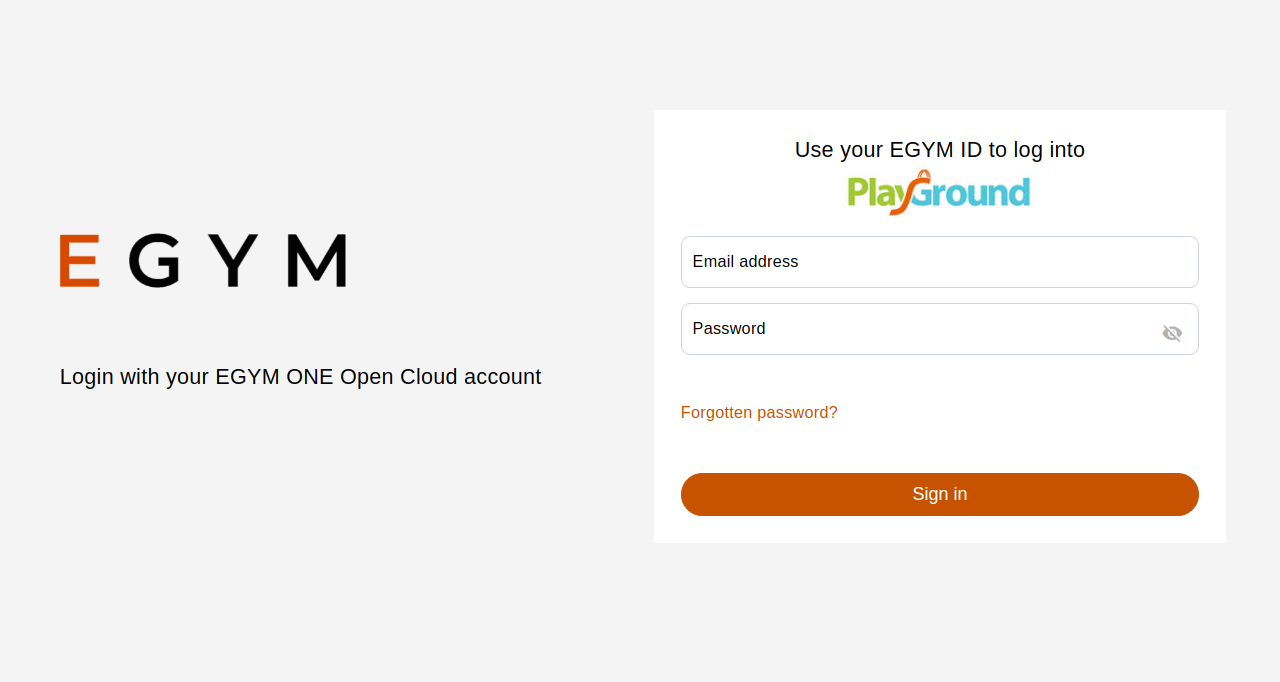
This requires a pre-registered with EGYM client with a callback URL. After the user successfully logs-in, the callback URL is called with the client token as a query parameter, called token.
Example redirect:
https://example.com/login-success?token=eyJhbGciOiJSUzI1NiIsInR5cCI6IkpXVCJ9.eyJpc3MiOiJmaXJlYmFzZS1hZG1pbnNkay11cG1jdkB0ZXN0LWNvLTEwMDYuaWFtLmdzZXJ2aWNlYWNjb3VudC5jb20iLCJhdWQiOiJodHRwczovL2lkZW50aXR5dG9vbGtpdC5nb29nbGVhcGlzLmNvbS9nb29nbGUuaWRlbnRpdHkuaWRlbnRpdHl0b29sa2l0LnYxLklkZW50aXR5VG9vbGtpdCIsImV4cCI6MTYyMDgzMTcwNywiaWF0IjoxNjIwODI4MTA3LCJzdWIiOiJmaXJlYmFzZS1hZG1pbnNkay11cG1jdkB0ZXN0LWNvLTEwMDYuaWFtLmdzZXJ2aWNlYWNjb3VudC5jb20iLCJ1aWQiOiJoZWluei0yMDIxLXVzZXJJZCJ9.cmS9ePpX-CJ2mbamVQXUf3InmuWw9ks1GaLRgsq8bwFjkHkTPS6YXKQAYp4AjcToQYM6KLRnfZbRJMG_JrDzopSJ9n9Xgnxr1yyqZ7bTAtmUNwRRboK4f4Wp-VaS9Q4wlp6METYIjui5FvbY-e3S6Ro_6o5bL5jwToBWXpjQ2pxTWKQcL3QHk2Xj2joaiCqL0ksH9c1kxvMMF5Qg07JySApef80bznLizM1wC330ZefG4z49MgGX1ubXwn-RS_YVbSdiKGifzsx82wG98A80mmCm01C8gXWks1KYBEqjZ96alZjqqDfXa08QuNwAqv_95qGsEBLaJq25O2yiGbhB9wThe token query parameter in the redirect call is the Firebase custom token, that can be used to get the user Identity token.
Method: GET
URL: https://id.egym.com/login Query parameters:
clientId- the pre-registered with EGYM client id for the application for the gym chain. EGYM will provide this clientId for production/test use.callbackUrl- the pre-registered with EGYM callback URL, that will be called with the Firebase custom token after the login process is done. This URL is provided by the gym chain to EGYM.
An example call could look like this: https://id.egym.com/login?clientId=c60b6665-6556-43cd-9bd8-05a79fceca1e&callbackUrl=examle.com/login-success
The user identity does not provide any user related information, but it can be used with the following API in order to retrieve additional information for that user. Such information could be the user's gym chain email, the user's name, gender, membership ID.
Method: GET
URL: https://id.egym.com/api/user Query parameters:
clientId- the pre-registered with EGYM client id, to identify the calling party.
Header parameters:
token:<identity-token>- the user identity token is required for authentication/authorization.
Response:
{
    "email": "user@email",
    "firstName": "User's first name",
    "lastName": "User's last name",
    "gender": "The user's gender. It can be one of: MALE, FEMALE.",
    "dateOfBirth": "date formatted yyyy-mm-dd",
    "membershipId": "EGYM user ID.",
    "mmsMembershipIds": ["Gym Member Management Software Membership ID.", "Can empty or be more than one.",],
    "mmsMembershipMap": "a map with key MMS Name and value membership ID"
    "contractEndDate": "end of contract formatted yyyy-mm-dd"
}An example call could look like this:
curl --request GET --url 'https://id.egym.com/api/user?clientId=<client-id>' --header 'content-type: application/x-www-form-urlencoded' --header 'token: <jwt-token>'